How we built food photo recognition — what's under the hood
A technical breakdown of NutriApp's photo recognition — which approaches we tried, what we landed on, where it still falls short, and where we're taking it next. No marketing gloss.
Today — about how photo recognition actually works in NutriApp. No marketing gloss, just what we tried, what landed, and what didn't.
Why bother
In classic trackers, logging a meal takes 1-3 minutes per dish. Open search, pick the right entry out of 47 lookalikes, set the grams, repeat for every ingredient. Over a day that's 5-10 minutes of "extra" busywork.
By day three most people quit. Not from laziness — the input cost simply grows larger than the value of tracking.
The whole point of photo mode is to cut that cost down to ~20 seconds: photograph the plate, the app breaks it into ingredients with estimated grams, you tweak it and save.
What we tried
Off-the-shelf image recognition services (Google Vision, Clarifai). They tell you the picture contains "pizza" or "salad bowl" but don't break the dish into ingredients with grams. Useless for calorie counting — we need the composition, not the label.
Training our own CV model. The idea: collect a dataset of regional dishes and train a model. We quickly realized you need hundreds of thousands of labeled plates for acceptable accuracy, and labeling costs millions. Unrealistic for our team size.
Vision models from Anthropic. This landed. The model looks at a plate photo the way a human does: "grilled chicken breast ~120 g + rice ~150 g + mixed veg salad ~80 g", and returns a structured JSON we drop into the meal log. No fine-tuning — a general model plus a well-crafted prompt, and it handles home cooking, café plates, fast food, simple restaurant dishes.
That's where we landed.
What it looks like in the app
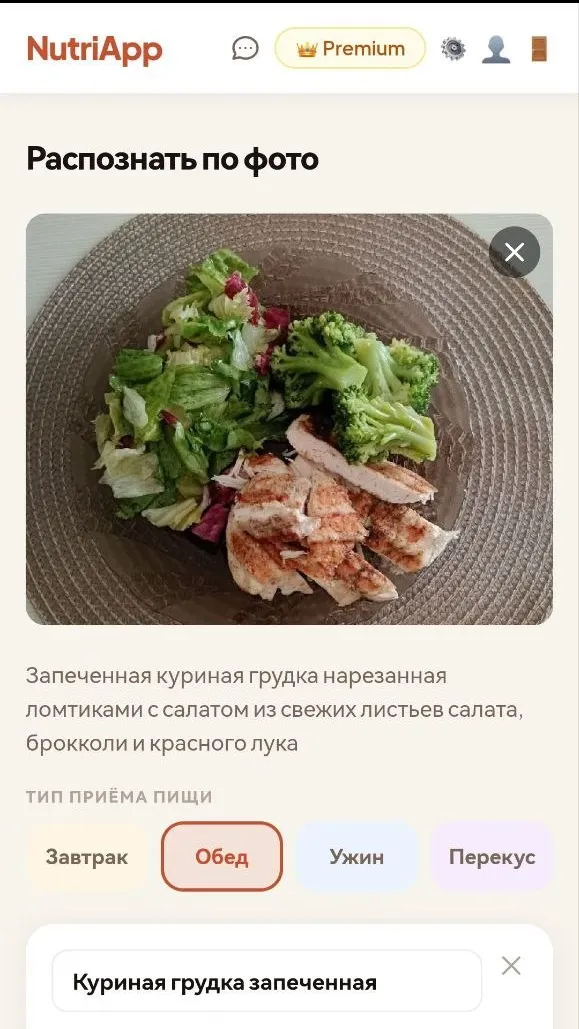
You upload a photo and get back a caption ("baked chicken breast, sliced, with fresh green salad, broccoli and red onion"), a list of ingredients with grams and macros, you pick the meal type (breakfast / lunch / dinner / snack) and save. Each ingredient's weight can be adjusted in one tap.
Where it isn't perfect
— Grams from a photo are always an estimate. A ±15-20 g miss per ingredient is normal. That's why there's a mandatory manual-tweak step after recognition: you see the suggested grams and can fix them.
— Complex layered dishes recognize worse than simple ones. Casseroles, multi-layer sandwiches, home stews where ingredients hide under each other — the model often only sees the top layer.
— Dark backgrounds, bad light, weird angles cut accuracy. It works best top-down or 3/4 view on a neutral background in daylight.
— Region-specific dishes. Uzbek manty, plov, homemade dumplings — the model sees "meat dumplings" and guesses grams from the average. Fine as a starting point, but for precision the catalog route is better.
What worked
For an "ordinary day" — a bowl of oatmeal, chicken with a side, a sandwich with coffee — photo mode saves real minutes. And the bigger effect: people start logging more often, because the meal-entry barrier dropped.
You can see it in analytics directly: users who use photo mode actively retain at multiples of those who only log via the catalog. Logical — input cost is the main barrier in calorie tracking.
What's next
In the pipeline:
- Better gram estimation for home-cooked dishes — stews, pilafs, casseroles. The plan is a vision + recipe-base pairing: the model recognizes "borscht", we pull a typical composition, then scale grams to the visible bowl size.
- Saved "your" dishes. If you eat the same meal often — no need to re-recognize each time. Photograph once → save as a template → log with one click after that.
- Packaging recognition. Photograph the nutrition label on the package — we parse calories and macros and create the product in your database. Especially useful for brands missing from the general catalog.
If you want to try it — open NutriApp. Photo mode is in the free tier with a daily cap; paid tiers remove the cap.
And if you use similar tools and notice we recognize worse than competitors on something — tell us in the comments. We actually iterate on those reports.
Count calories automatically in NutriApp
Open NutriApp